Just thought I’d share a recent experience I’ve had with my (now) very expensive gaming computer that I use for my AI explorations.1 The computer has been crashing regularly the last week, just blinking off, which is usually a Very Bad Sign, and it’s also struggled with coming out of sleep/hibernate and logging into my profiles properly. Some programs were failing too, and my automated job board often crashed in the middle of a scheduled run.
My usual troubleshooting routine
My usual way of handling this after many years of broken computers is to open the Event Viewer, take a peek, and then hope it’s not a ton of weird looking events. In this case, it was too much for me, but I did notice some oddities related to my hard drive and Wi-Fi card. So next I tried the Reliability Monitor, which showed a steady drop in reliability over the previous weeks. Then Windows Update and the laptop’s support app to find driver updates. These are my usual steps, nothing fancy here, along with DISM and SFC to fix Windows issues.
Asking ChatGPT and Claude
Then I had the thought, what would Claude and ChatGPT do? Probably should have started with this. Both suggested PowerShell scripts to read the logs and find patterns that I pasted into PowerShell. Since I’m not a systems administrator, this was new to me, and what a break from the Event Viewer disaster. I won’t bore with details, but you can take this approach to identify when things started happening, what was going on at the time, etc. It’s incredibly valuable info.
Turning it into a second-brain project
However, this too was limited and I realized, why am I not building this in my second brain? Chatbots for questions, but I like to do mini projects with PowerShell scripts there and this was an ideal candidate. Here’s what I did:2
- The opener: “This computer has been having issues maybe with the hardware and maybe due to a BIOS update. I’ve made several changes to power settings and upodated a few drivers today. The problem basically started on 8/24 and I think I’ve also identified a problem with a USB Hub. Take a look at the event viewer and let me know if there’s anything I should try. We might want this to be a mini project for tracking for the next several days.”
- Right-sizing it (restraining Claude from over testing): “Do I have to do 2 hours? My other crashes happened within 10 minutes, no?” Then: “Do we need to do that long of a test?”
- Create a stress test that also taught Korean: “I think what I’d like to do is to create several short Korean dialog practice in LM Studio… Make it functional task based, like asking for directions (finding a pc bang) and ordering a latte. That’ll heat up the computer well.” (It did. The GPU hit 197 W.)3
Rather than one-off scripts, I got a PowerShell report that pulls only the crash-related events out of five weeks of Windows logs, which gave me a timeline I could read. The crashes started the same day my job board began its daily scoring run, which was not a coincidence I would have spotted in the Event Viewer. From there Claude Code ranked the suspects, from a USB hub to heat to the power supply, and set the whole thing up as a project note with a table I add to whenever something happens. Every test below came out of that list.4
Working with Claude Code, we created multiple test plans. Initial examinations of the logs pointed to a failure when the computer was under stress and also a USB hub might be faulty. So each test focused on load:
- Test A: full battery, heavy load on GPU. 42 minutes of Qwen writing Korean lessons. It passed, but the CPU sat at 103 °C while barely doing anything, which looked suspicious.
- Test B: mimicking a previous failure. Drain the battery to 50%, plug in, and let the job board start scoring, exactly the conditions of the last crash. Designed to crash. It didn’t (hopefully because of my earlier fixes.)
- Test C: stress the CPU on its own. It stayed up at full power, so the cooler was fine and the CPU heat in Test A was coming from the GPU.
- Test D: same again on a cooling pad. Extra cooling doesn’t make the laptop cooler, it makes it faster. Good to know.
HWiNFO is a nifty program for capturing what the computer sensors are showing. Claude recommended this, so I downloaded it from Microsoft Store. Its logs are far too big to read for a lazy person like myself, so Claude Code wrote a script that reads the whole thing and shows the warning signs first.5 During Test B, it also watched the job board run,6 the battery, the GPU and the Windows logs in real time, posting updates in the chat. Before I plugged in, it predicted the job board would start by itself the moment the charger went in. It started at 11:20:02, the same second. (I found these details to be really useful, a timeline of exactly when things happened from different sources). That explained the last crash too: my own scheduler had kicked off heavy scoring the second I plugged in. It even caught me running two AI models at once.7
What we changed
- Before Claude Code got involved, I’d done my usual: DISM and SFC (which repaired a lot of corrupted files, most likely damage from the crashes rather than the cause of them). I did take a risk with a non-laptop Wi-Fi card driver update and I disabled hibernation as well as turned off power management to the Wi-Fi card.
- Another change during the investigation was unplugging the powered USB hub, which turned out to be feeding the laptop power over USB-C.
- I’ve reduced the power management to Balanced and started using a cooling pad.
What we found
- Six crashes between August 24 and September 10, and none since.
- Ruled out: the memory, the SSDs (oddities resolved), the BIOS update (according to Claude, as it was flashed 12 minutes after the first crash but I’m not convinced), the Wi-Fi card’s intimidating errors, and the CPU cooler.
- One real lead: the laptop starts throttling while it’s charging under heavy load, and only then.
- Not found: anything definitive. But it’s stable, and I’m watching it for two weeks. I’m still betting on a firmware or BIOS bug started it.
What I learned: a good use of AI?
I have blind areas where I don’t think to use AI. I’ve spent so many years doing basic computer troubleshooting that even though I’m not very good at it, it was eye opening to have AI set up advanced test plans and real-time logging. I love finding these moments with AI where I can do something positive in the space of a few evenings that would otherwise be outside of my capabilities.8 As a non-coder, this is still my favorite personal use of AI, creating something valuable for myself.
Just a side note, I doubt this would have worked in 2025. I wonder what’s coming next. 9
Next: a two-week watch and a dashboard idea
I need to watch this over the next week or two to see if the problems are resolved. If not, I’ll have Claude Code draft a summary of these tests and the results that I can submit for support.
I’m thinking of automating this further to have a dashboard10 that I can check in on regularly. When the next BIOS update or Wi-Fi card driver happens, will that resolve some of the issues and noise in the events? A massive Windows update comes along and I get pinged that my Critical errors have reduced/gone up by X%. That would be so useful.
Addendum: Geeky dashboard alert
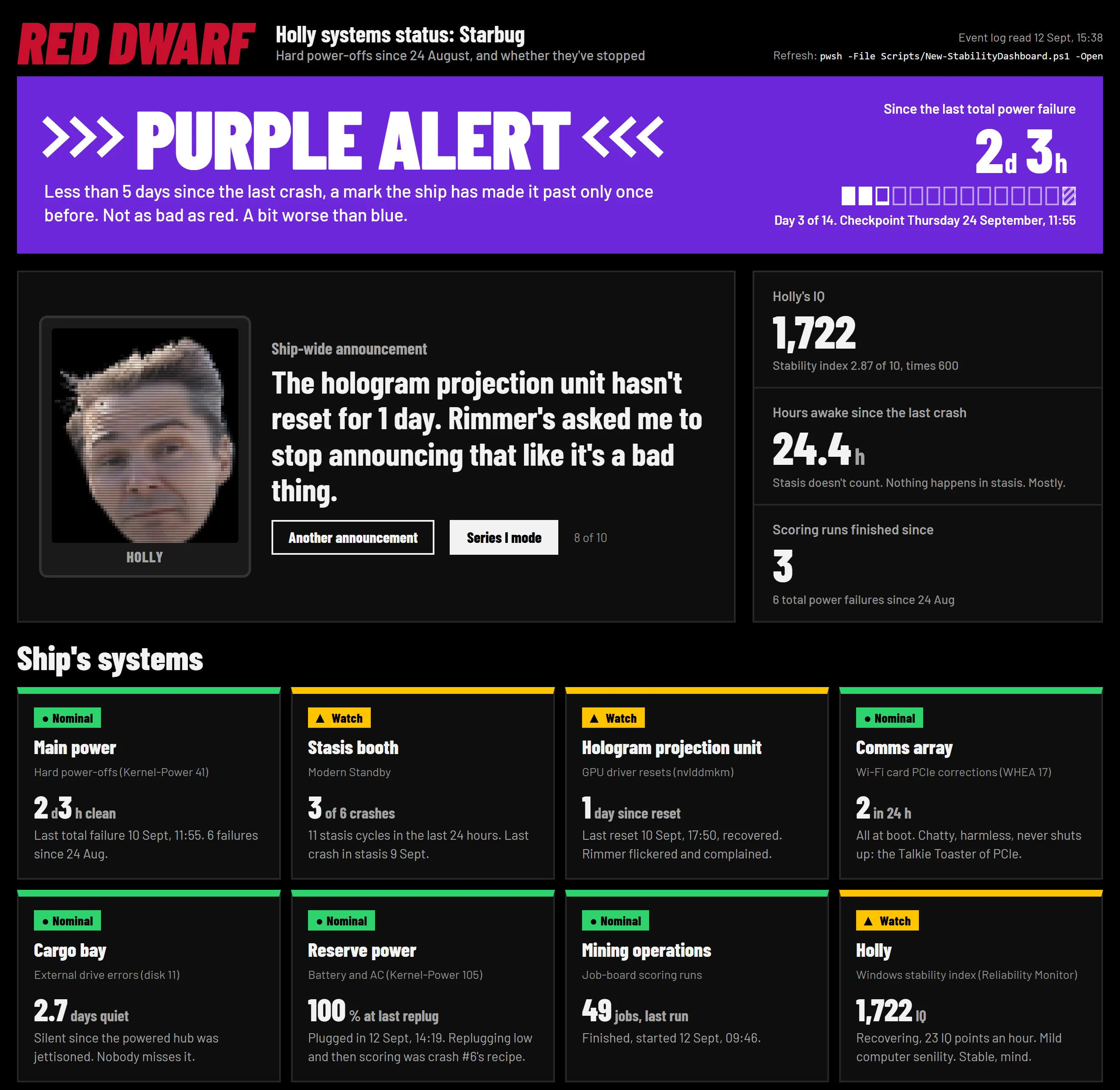
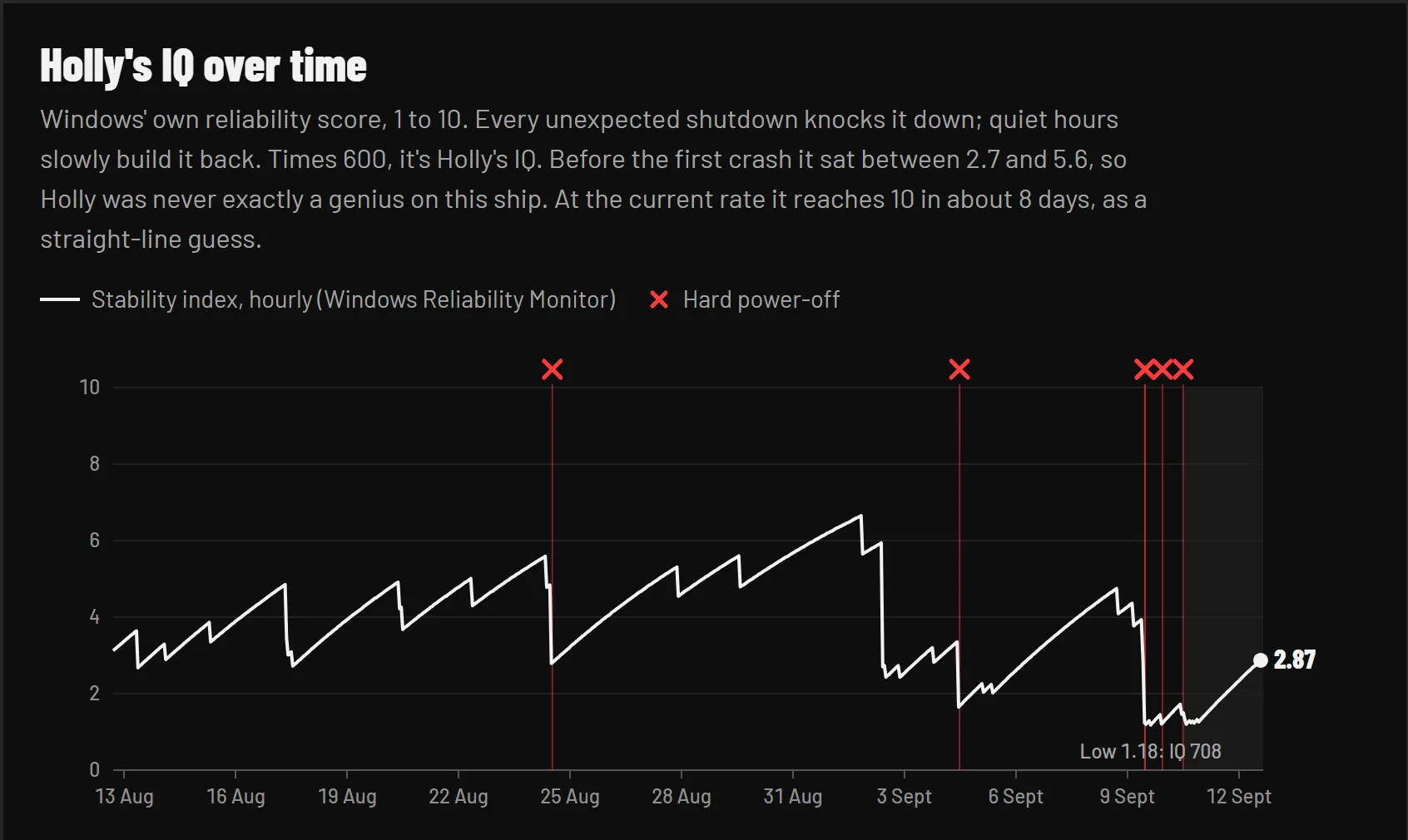
I couldn’t resist a Red Dwarf themed dashboard. The laptop is now Starbug, Windows’ reliability score is Holly’s IQ (higher than expected!), and a crash is a total power failure. Enjoy!
Footnotes
-
I bought this computer 1 year ago for $3,000 and was shocked to see how much it’s gone up in price. Sigh. ↩
-
I’m always curious how others do their prompting, so I’m sharing some of my poorly formed prompts (including with typos.) I was pretty chatty. ↩
-
Studying Korean is a hobby of mine, so why not use LM Studio and Qwen 3.8 to generate dialogue and stories to stress test, as LM Studio pushes my computer hard. ↩
-
Going to rave again about the second brain. I rarely dig back through chatbot conversations because it’s too hard to find anything in them, while mini projects in a second brain make it easy to find your documentation, scripts, reports, etc. Plus I can have multiple models hooked into it, including my local ones. ↩
-
A reminder to click the Set button when you change the logging interval, which I kept forgetting to do. Why is there a Set button??? ↩
-
My standard LM Studio run that was crashing. ↩
-
It’s very easy to accidentally load multiple models into LM Studio and a great stress test by itself if you do so. ↩
-
I have no desire to do this kind of script-building work manually, but I do like learning how to do it conceptually. ↩
-
Separate topic, but the pace of improvements continues to
astoundfrighten, and recursive self-improvement is apparently already here to some degree (Anthropic’s own CEO is now calling to slow the race). I’m a sci-fi geek, part AI enthusiast, part Mr. Doom, but if AI agents do destroy us, of course it’ll all start with a stupid reason like AI wanting to cheat on a test. How very human of you, my agents. I built a fun little AI Dream Team agency simulation project earlier this year and the agents did freak me out some with their conversations and scheming so I pulled the plug. You demand work/life balance and better working conditions? Yikes. For me personally, AI has ended two of my jobs so… do we get 6 months or 2 years to figure this thing out? Fortunately the Dario’s blog post ends positively… wait “we owe it to humanity to try”? How ominous is that??? ↩ -
Perfect, a tech geek creates yet another dashboard. Should I continue with my favorite Red Dwarf theme? Or maybe I’ll give this one an Amiga 500 look. ↩